Prefer to read offline? Download this article as a PDF
Distractions in the digital world are an integral part of our lives. Social media notifications, emails, news updates and endless online content constantly compete for our attention. Even when we are in the middle of an important task, it is hard to avoid interruptions.
Blocking out distractions is good. But it doesn’t explain why the distraction had a hold on you in the first place.
This is where the AI Coach in FocusMe takes the concept of productivity tools to the next level. Instead of just helping you block out distractions, the AI Coach feature shows you where your time actually goes and how to improve your productivity.
Short version
Block the sites and apps that pull you off a study session, on a timer or a schedule, on your laptop and phone.
Try it free for 14 daysLet’s take a closer look at how the AI Coach feature works and what makes it stand out.
Introducing AI Coach in FocusMe
FocusMe was created to help people regain control over their time. By blocking distracting websites and applications, the software allows users to create an environment where productivity becomes easier.
However, the team behind FocusMe recognized an important challenge.
For example, someone might not know:
- When they are most productive during the day
- Which apps interrupt their workflow the most
- How often they switch between tasks
- What triggers their distractions
Without this awareness, it becomes difficult to build better productivity habits.
This insight led to the development of AI Coach in FocusMe.
What Makes AI Coach Different from Other Tools
Most distraction blockers follow a simple method. Users choose websites or apps they want to block and set a schedule for when those platforms should be unavailable. This approach is helpful, but it has a limitation.
Traditional blockers only react to distractions. They stop access to certain websites. But they do not analyze behavior or help users improve their work habits. AI Coach in FocusMe takes a smarter approach.
For example, the Coach might notice that you:
- Check social media frequently during certain hours
- Switch between tasks too often
- Lose concentration after long work sessions
- Open specific apps that interrupt productivity
With this information, AI Coach can provide personalized recommendations to improve focus.
How AI Coach Works
AI Coach is built into FocusMe on your computer, and it is opt-in: nothing is collected until you switch it on. The first time you open Coach from the sidebar, FocusMe asks for your consent and explains what it collects: the app names and website domains in your activity, never window titles, linked to a pseudonymous token kept separate from your account details. You can switch it off, or delete your Coach data, at any time in Settings.
Once it is on, the process happens in three main stages.

Analyzing Screen-Time Patterns
The first step is understanding how users spend their digital time.
AI Coach works from the activity FocusMe already records on your computer (the same data as the Activity view, so Record Activity needs to be on). It looks at patterns such as:
- When work sessions begin
- How long focus sessions usually last
- Which apps interrupt productivity
- How frequently distractions occur
It needs at least two days of activity before it can report, and a full week gives a much clearer picture.
Identifying Productivity Trends
When you ask for a report (you can generate up to three a day, for any period from today to the last 30 days), AI Coach looks for patterns in that data.
For example, it may discover that:
- You are most productive in the morning
- Distractions increase during certain hours
- Some apps repeatedly interrupt your focus
- Work sessions are shorter than expected
Knowing these patterns is an important step toward improving productivity.
Recommending Better Focus Plans
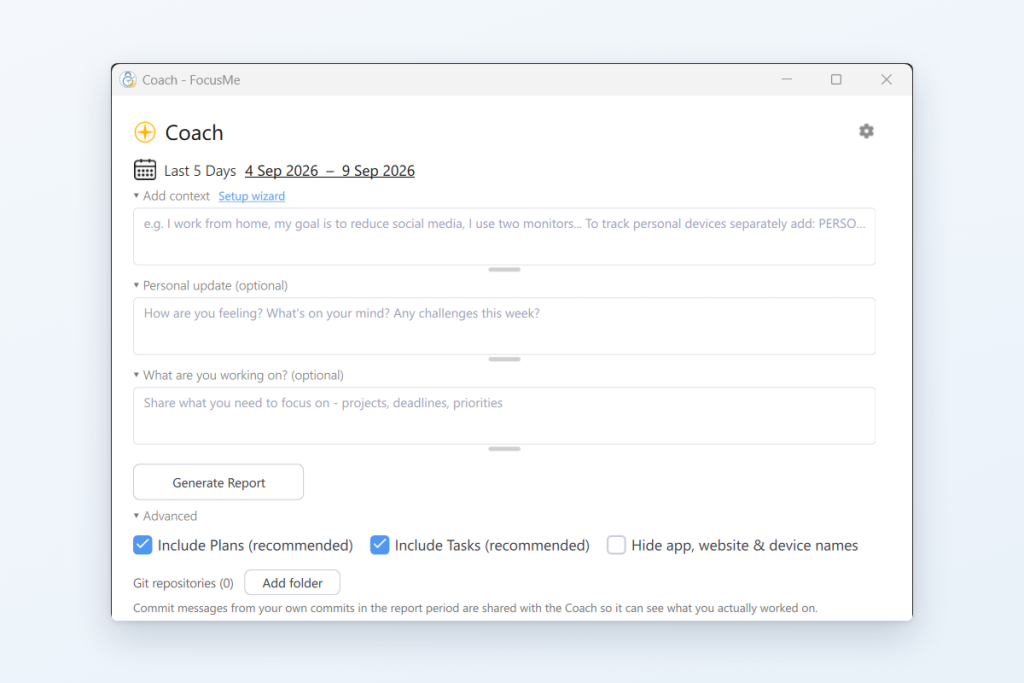
Each report gives you a headline, your numbers for the period, your top apps and websites, the key findings about your habits, and specific FocusMe plan and task suggestions with an estimate of the time you could save. You apply a suggestion with one click, or decline it and tell the Coach why. Suggestions may include:
- Adjusting blocking schedules
- Blocking or limiting the apps that interrupt you most
- Improving focus session timing
- Creating better break intervals
You can also tell the Coach about yourself, your projects and what you are working on, and ask it questions about the report in a chat underneath it. Because these recommendations are based on real usage patterns, they are more effective than general productivity advice.
This personalized guidance is what makes FocusMe different from most productivity tools.
Benefits of AI Coach in FocusMe
AI Coach provides several benefits that help users work more effectively and manage digital distractions.
1. Better Awareness of Work Habits
Most people are unaware of the amount of time spent switching between tasks or surfing distracting websites.
The AI Coach points out these patterns to you so that you can understand how you are using your time.
After understanding your patterns, you can easily increase your productivity.
2. Protecting Your Most Productive Hours
Each day has periods when you are more focused and can be more productive.
AI Coach helps identify these periods and suggests stricter blocking during those hours. This ensures your best mental energy is used for important work.
3. Creating Smarter Focus Schedules
Rigid productivity schedules often fail because they do not match real work patterns.
AI Coach allows FocusMe users to create flexible focus plans based on their actual habits.
This makes productivity systems easier to maintain in the long run.
4. Preventing Burnout
Working continuously without breaks can reduce productivity and increase stress.
AI Coach encourages balanced work patterns by recommending healthy breaks and better scheduling.
This helps users stay productive without feeling overwhelmed.
5. Reclaiming Lost Time
One of the biggest benefits of using FocusMe is recovering time lost to digital distractions.
AI Coach strengthens this benefit by showing where distractions occur and how to reduce them.
Over time, these improvements can save hours of productive time each week.
Getting Started with AI Coach in FocusMe
Using AI Coach inside FocusMe is simple. If you already use the software on your computer, click Coach in the sidebar, choose Yes, Enable, and then generate your first report once a couple of days of activity have built up. Instead of only blocking distractions, you gain insights that help improve your productivity strategies.
New users can start by installing FocusMe, setting basic blocking rules and switching on the Coach, then asking for a report after the first few days.
You can also set the Coach to prepare a report for you weekly or daily, and it will let you know when one is ready.
Over time, these small improvements can transform how you work and help you stay focused for longer periods.
Final Thoughts
It is getting harder to stay focused in the digital world we are living in today.
Helping users stay focused can be done by blocking apps and websites. This is what the old tools can do. However, to be more productive, you need more than that. You need to understand how you work and how to improve the way you work.
This is what the AI Coach in FocusMe adds: the blocker keeps the distractions out, and the Coach shows you how to work smarter and how to better protect the attention you have.
For how the Coach compares with a task manager, read AI Productivity Coach vs. Traditional Productivity Apps; for using it to change your habits, How AI Can Help You Build Better Digital Habits. Learn more about the AI Coach feature here.
FocusMe for students
Study without the tabs that eat the evening
Block the sites and apps that pull you off a study session, on a timer or a schedule, on your laptop and phone.
Start your free 14-day trialNo credit card needed.
FAQs (Frequently Asked Questions)
What is the AI Coach in FocusMe?
The AI Coach is a smart feature that analyzes your activity patterns and suggests personalized blocking plans and routines to improve focus.
How does FocusMe help reduce distractions?
FocusMe blocks websites, apps, or every website based on your custom rules, helping you stay focused on important tasks.
Can the AI Coach create personalized focus plans?
Yes, it studies the activity FocusMe records, with your consent, and recommends tailored plans that you can apply with one click.
What makes FocusMe different from other blockers?
It combines strict blocking, habit tracking, scheduling, and AI-driven recommendations, making it more advanced than basic blockers.
Does FocusMe allow flexible control over distractions?
Yes, you can fully block, partially limit, or set time restrictions for apps and websites depending on your needs.
What is Enforced Mode in FocusMe?
Enforced Mode means the plan runs to its end; while it runs it cannot be stopped or weakened, only made stricter.
Can FocusMe track my productivity?
Yes, it provides detailed activity tracking and insights so you can understand where your time is going and improve habits.
Is FocusMe suitable for students and professionals?
Absolutely, it is designed for anyone who wants to improve focus, including students, remote workers, and business professionals.
Does FocusMe support scheduling and routines?
Yes, you can create schedules, Pomodoro sessions, and automated routines to build consistent productivity habits.
How does FocusMe improve long-term productivity?
By combining AI insights, strict controls, and habit-building tools, FocusMe helps users develop sustainable focus and reduce digital distractions over time.
Want to talk it through? Join the FocusMe community