

Play when you choose to, not every time you’re bored
“One more match” turns into 2am far too easily. FocusMe blocks or limits games on your computer and phone, so the decision is made before the urge arrives.
Works on Windows, macOS, Linux, Android and iOS. No credit card required.

Sound familiar?
- You sit down for one game and look up three hours later.
- Work, study or sleep keeps losing to “just one more”.
- You’ve uninstalled a game, then reinstalled it the same week.
- You promised yourself weekends only, and it’s Tuesday.
If any of that rings true, willpower isn’t the problem. The game is designed to keep you playing, and it’s always one click away. FocusMe puts some distance back.
Signs gaming has gone past a habit
Most people who game do it for fun, and that’s fine. It’s worth taking a closer look if several of these sound like you:
- You play for much longer than you planned, most days.
- You think about gaming when you’re not playing, and look forward to little else.
- You feel irritable or restless when you can’t play.
- You’ve tried to cut back and it hasn’t lasted.
- Sleep, work, school or relationships are suffering because of it.
- You hide how much you play from people close to you.
- You play to escape stress or a low mood, and feel worse afterwards.
The World Health Organization lists “gaming disorder” in its international classification of diseases, so it’s taken seriously. Only a doctor can diagnose it, though. If gaming is affecting your health, work or relationships, talking to your GP or doctor is a good first step.
Why it’s so hard to stop
Modern games are built to keep you coming back. Daily login rewards, battle passes and limited-time events mean that stopping feels like losing something. Ranked ladders and seasons give you a target that’s always just out of reach. Loot boxes and random drops reward you at unpredictable moments, which is exactly what makes them hard to walk away from.
Matches also have no natural end to the session. Each one is short, the next is a click away, and your friends are still online. Willpower is up against a team of designers whose job is to keep you playing. Changing the setting around you is often easier than fighting that in the moment.
How FocusMe helps
Block games completely during work, study or school nights. Block Steam and every game goes with it, or block just the games and keep the Steam client for chat. How to block Steam games.
Give yourself a gaming budget. On your computer, a Time Limit allows, say, 4 hours a week, then blocks the games until the week resets. It counts actual play, not clock time.
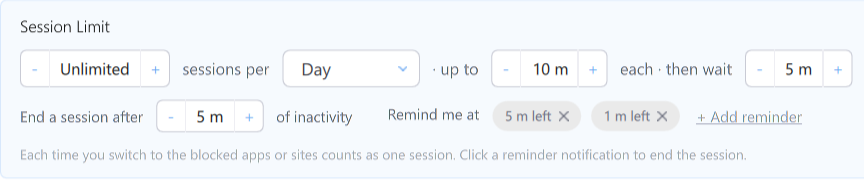
Make “one more match” harder. A Session Limit caps how many gaming sessions you get a day, with a wait in between.
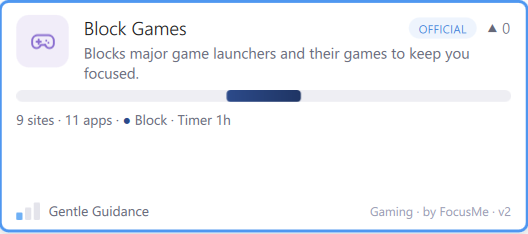
Ready-made plan. On Windows, import the official Block Games plan from the Plan Library and start in a minute.
Mobile games too. FocusMe for Android and iPhone blocks or limits game apps, on a schedule you set.
Hard to cheat. Choose how strict each plan is, from a few typed characters to stop, up to no way to stop until the time is up. On your computer, add an accountability partner if you want someone else to approve a stop.

See the change. The Activity view shows how much time goes on each app, so you can watch your gaming hours come down.
Start in three steps
Download FocusMe and start your free trial.
Import the Block Games plan, or pick your own games and launchers.
Set when gaming is allowed, choose how strict, and start the plan.
Tips that help alongside FocusMe
- Decide your gaming hours in advance, when you’re not in the middle of a game. A plan made at noon holds up better than a decision made at midnight.
- Stop at a natural break, such as the end of a match, rather than when you “feel done”. You rarely will.
- Turn off game notifications on your phone and in launchers, so events and rewards don’t pull you back in.
- Replace the time, don’t just remove it. Plan something for the hours you free up: exercise, a hobby, seeing friends in person.
- Tell a friend or partner what you’re aiming for. Better still, make them your accountability partner in FocusMe on your computer.
- Keep the console or gaming PC out of the bedroom if you can, so late-night sessions take more effort to start.
Frequently asked questions
Is gaming addiction real?
The World Health Organization recognises gaming disorder, where gaming takes priority over other parts of life and carries on despite the harm. Most people who game a lot don’t have it, but many would still like to play less. Only a doctor can diagnose it.
Can FocusMe block Steam, Epic or Battle.net?
Yes. Block the launcher and nothing can be started through it, or block individual games and keep the launcher open. On Windows, one rule can cover your whole Steam library folder, including games you install later.
Can I still play at weekends?
Yes. Draw the hours you want blocked on a weekly schedule and leave the rest free. On your computer you can also give yourself a weekly time budget instead.
Does it work on a games console?
No. FocusMe runs on Windows, Mac, Linux, Android and iPhone. It can’t reach an Xbox, PlayStation or Switch.
Can I use it for my child’s gaming?
Yes. Many parents use FocusMe to set gaming hours on a child’s computer. A password or strict setting keeps the plan in place.
How much gaming is too much?
There’s no single number. A better test is whether gaming crowds out sleep, work, exercise and people. If it does, a budget such as a few hours a week is a sensible place to start.
Take back your evenings.
Try FocusMe free for 14 days. Full features, full support, no credit card required.
Start your free trial