

Watch one episode, then actually stop
Autoplay decides for you, and one episode becomes a season. FocusMe blocks or limits Netflix, YouTube and other streaming sites and apps, so the decision is yours again.
Works on Windows, macOS, Linux, Android and iOS. No credit card required.
Sound familiar?
- You meant to watch one episode and the countdown started the next.
- YouTube is on while you work, and somehow the work isn’t getting done.
- You go to bed hours later than you planned, because the series wasn’t finished.
- Weekends disappear into a box set.
Streaming is designed so there’s never a natural place to stop. FocusMe gives you one.
Signs binge-watching has gone past a habit
A lazy Sunday with a good series is one of life’s pleasures. It’s worth taking a closer look if several of these sound like you:
- You regularly watch far more than you meant to.
- You stay up late to finish “one more”, and pay for it the next day.
- You put off work, exercise or plans with friends to keep watching.
- You feel restless or bored when there’s nothing on.
- Something is always playing in the background, even when you’re not watching.
- You’ve tried to cut back and drifted back to the same hours.
Only a doctor can diagnose a problem. If your viewing is affecting your sleep, mood or relationships, talking to your GP or doctor is a good first step.
Why it’s so hard to stop
Streaming services are built to remove the moment where you decide. Autoplay starts the next episode before the credits finish. Cliffhangers are placed at the end of episodes on purpose. Recommendations line up something new the moment a series ends.
On YouTube, the next video is already queued, and Shorts play one after another with no gap at all. With TV, the schedule used to end the evening for you. With streaming, the only thing that ends it is your willpower, at the time of night when there’s least of it left.
How FocusMe helps
Block streaming during work, study or bedtime. Netflix, YouTube, Disney+, Prime Video, Twitch: the websites and the apps, on your computer and phone.
Give yourself a viewing budget. A Time Limit allows, say, 90 minutes of streaming an evening, then blocks it until tomorrow. It counts actual watching.

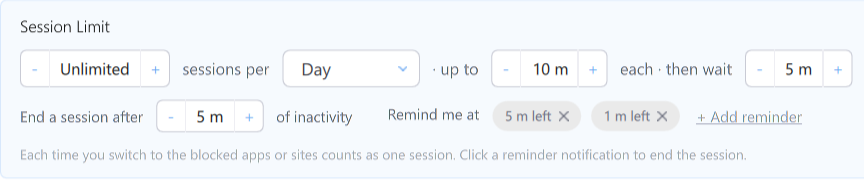
Stop the autoplay spiral. A Session Limit allows a set number of sessions with a maximum length each, so one episode means one episode.
Keep YouTube, lose Shorts. On your computer, block YouTube Shorts and keep normal videos, search and channels.
Set a cut-off time. Block streaming from 11pm every night so the last episode is always the one before bed.
Start in three steps
Download FocusMe and start your free trial.
Add the streaming sites and apps you watch.
Choose a block, a nightly budget or a session limit, set how strict, and start it.
Tips that help alongside FocusMe
- Turn off autoplay. Netflix and YouTube both let you switch it off in their settings, so each episode ends with a choice.
- Decide the number before you start. “Two episodes” is easier to keep than “a bit”.
- Stop mid-episode, not at the cliffhanger. It’s much easier to walk away when nothing is left hanging.
- Watch with someone else. Shared viewing tends to end at a sensible time.
- Keep screens out of the bedroom if late-night viewing is the problem.
- Have something to switch to, like a book, a walk or a call, so the evening doesn’t default to the next episode.
Frequently asked questions
Can I still watch at weekends?
Yes. Block streaming on weekday evenings and leave weekends free, or give yourself a bigger budget on Friday and Saturday.
Can FocusMe block YouTube Shorts but not YouTube?
Yes, on your computer. You can block just the Shorts feed and keep ordinary videos, search and channels.
Does it work on my smart TV?
No. FocusMe runs on Windows, Mac, Linux, Android and iPhone. It can’t reach a smart TV or streaming stick.
Does it work on my phone?
Yes. FocusMe for Android and iPhone blocks or limits streaming apps. Both are free to download, and every desktop licence includes Premium for up to 2 mobile devices.
Is binge-watching bad for you?
An occasional binge is harmless for most people. It becomes a problem when it regularly costs you sleep, time with people or the things you meant to do. A nightly cut-off is a simple way to keep it in its place.
Get your evenings back.
Try FocusMe free for 14 days. Full features, full support, no credit card required.
Start your free trial