

Windows 11 and 10
The website and app blocker for Windows
Block distracting websites, apps and games on your PC, on a schedule you set, with protection that holds when willpower does not. Every browser, every app, no extension required.
Free 14-day trial. No credit card. Windows 10 or later, 64-bit. Version 8.1.4.7.

What to block
Websites, in every browser on your PC
Type a site, pick a ready-made list (Social Media, News, Video Streaming, Messaging, Gaming), or block the whole internet except the sites you allow. The block holds in Chrome, Edge, Firefox, Brave and Opera alike, with no extension to install. The free FocusMe extension for Chrome, Edge and Firefox makes URL detection faster and more precise, and it is one click from the download page.

Windows apps and games
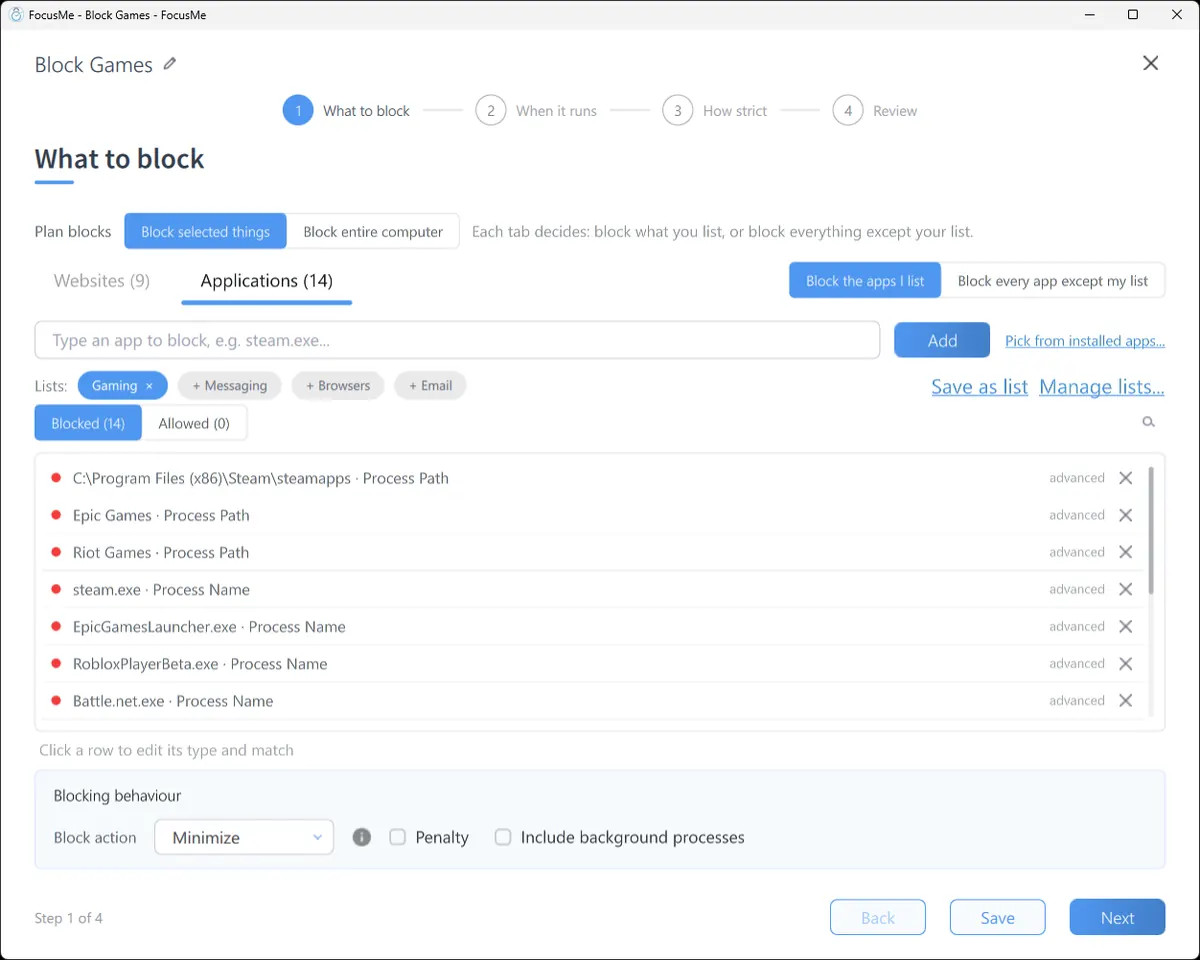
Pick from your installed apps, type a process name, or point at a folder such as your Steam library. Steam, Epic, Battle.net, Riot, Discord, Netflix for Windows, Microsoft Store apps: if it runs on Windows, FocusMe can block it or limit it. A blocked app is closed or minimised the moment it opens, with a message that says which plan did it.
When it runs
Schedules and time limits that run themselves
A Quick Timer for the next hour. A weekly schedule that blocks social media from 9 to 5 on weekdays and leaves the evening alone. A Pomodoro cycle for a writing session. A multi-day plan for exam week.
Or give yourself a budget instead of a ban: 10 minutes of Reddit a day, three YouTube sessions of 10 minutes, and when it is spent the site is blocked until tomorrow. Screen breaks lock the screen at intervals you choose, with a countdown, so the break happens.

How strict
From a nudge to Enforced Mode
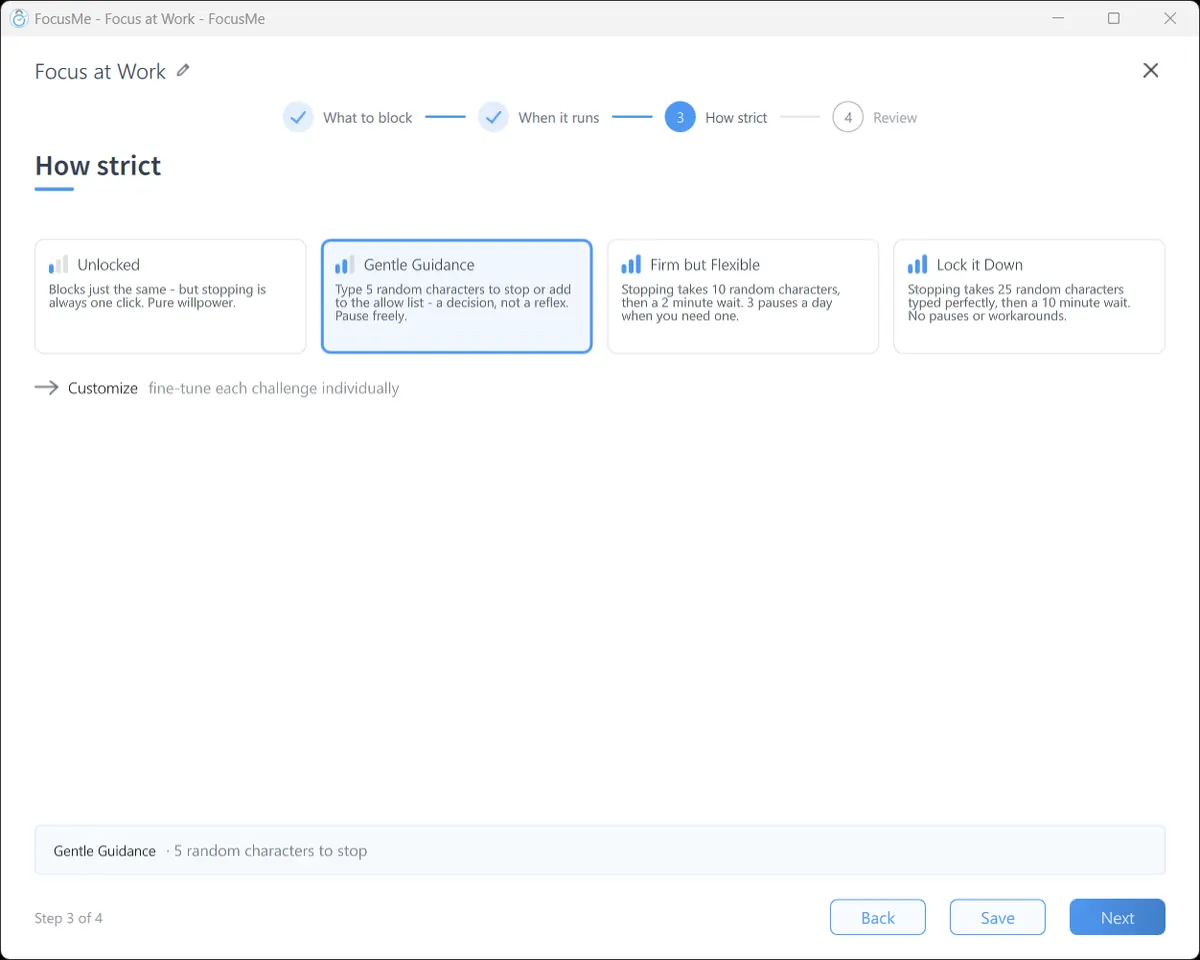
Four levels. Unlocked blocks just the same, but stopping is one click. Gentle Guidance asks you to type five random characters before a plan stops: a decision, not a reflex. Firm but Flexible adds a wait and a daily pause allowance. Lock it Down means 25 characters typed perfectly, then a wait, and no pauses.
Enforced Mode goes further: while a plan runs it cannot be stopped or weakened, FocusMe cannot be quit, and the plan can only ever be made stricter. On Windows, a plan can also keep Windows Settings and Task Manager closed while it runs, and the Extra Protection Service keeps FocusMe running through restarts. If you want a human in the loop, an accountability partner can approve a stop instead of a typing challenge.
Built for Windows
Every browser
Chrome, Edge, Firefox, Brave, Opera. Free extension for Chrome, Edge and Firefox.
Store apps and games
Microsoft Store apps, Steam, Epic, Xbox and other launchers, by name or by folder.
Network block
Stop a site loading at all on this PC, whichever app opens it (standard installation).
Works offline
Blocking does not need an internet connection.
Runs from the tray
Close the window; FocusMe keeps working from the notification area.
Command line
Start, stop and list plans from PowerShell or Task Scheduler.
See where the hours went
The Activity tab shows active time per app and site, the distractions blocked and the time reclaimed, for today or the last seven days. Tasks keeps a to-do list beside your plans. The AI Coach reads your week and suggests concrete changes to your plans, applied in one click.

One account, your PC and your phone
Sign in on Windows and on Android or iPhone and your plans sync. Every licence covers 5 computers and 2 mobile devices, with Premium on mobile included. Also available for Mac and Linux.
- Windows
- Mac
- Linux
- Android
- iPhone
Requirements and download
- Windows
- 10 or later, 64-bit. Windows 11 supported.
- Version
- 8.1.4.7
- Installer
- FocusMeSetup.exe, standard installation.
- Accounts without administrator rights
- A separate installer is on the download page.
- Browser extension
- Chrome, Edge, Firefox (free).
- Price
- 14-day free trial, then monthly, yearly or lifetime. 60-day money-back guarantee.
The download starts on the next page, which also shows the install steps.
Frequently asked questions
Does FocusMe work on Windows 11?
Yes. FocusMe runs on Windows 10 and later, 64-bit, and is updated regularly for new Windows releases.
Does it block websites in every browser?
Yes. A site you block is blocked in Chrome, Edge, Firefox, Brave, Opera and any other browser on the PC, so switching browser changes nothing. The free extension for Chrome, Edge and Firefox makes the blocking faster and more precise.
Can it block apps and games, not just websites?
Yes. Any installed app, game or launcher, including Microsoft Store apps, by name or by folder. Steam, Epic, Battle.net, Riot, Roblox and Discord are the usual suspects.
Can I limit time instead of blocking?
Yes. Set a daily or weekly allowance for a site or app, a number of sessions, or a launch limit. When it is spent, the site or app is blocked until the next period.
What happens if I try to stop a plan early?
It depends on the strictness you chose. Unlocked stops in one click. The stricter levels ask for a typing challenge and a wait, and Lock it Down allows no pauses. An Enforced Mode plan runs to its end.
Is FocusMe free on Windows?
There is a 14-day free trial of everything, with no credit card. After that, monthly, yearly or lifetime plans; one licence covers 5 computers and 2 mobile devices.
Ready to take back your Windows PC?
Try FocusMe free- 14-day free trial
- No credit card
- 60-day money-back guarantee