Prefer to read offline? Download this article as a PDF
We all know how easy it is to get distracted while working on a computer. Whether it’s social media, news websites, or endless YouTube videos, distractions can quickly eat away at your precious time. If you’re looking for a way to stay focused and improve your productivity, a website blocker for Windows could be exactly what you need.
In this blog, I’m going to walk you through how a website blocker for Windows can help you take control of your time, avoid unnecessary distractions, and boost your productivity.

Why Do You Need a Website Blocker?
Have you ever found yourself working on an important project, only to suddenly get lost in a rabbit hole of random websites? It’s easy to start with a simple search for something you need, but before you know it, you’ve spent hours scrolling through unrelated content. This constant cycle of distraction is not only frustrating, but it can also hurt your productivity.
And when it comes to tools designed to help you do just that, FocusMe stands out: it blocks distracting websites and apps on a schedule or a timer, and on Windows it covers every browser. Block distractions. Get more done.
FocusMe
Block the sites and apps that pull you off track, on a schedule or a timer, on your computer and phone.
Try it free for 14 daysHow a Website Blocker for Windows Can Improve Your Focus
You might be wondering, how exactly can a website blocker for Windows help you stay focused? Let me break it down.
Eliminating Temptations
How many times have you told yourself you’ll only check your email for five minutes, only to end up wasting an hour on irrelevant emails or endless threads? With a website blocker for Windows like FocusMe, you can block email portals, social media, or news platforms. Removing that temptation makes it easier to stay locked into your work.
Reducing Time Wastage
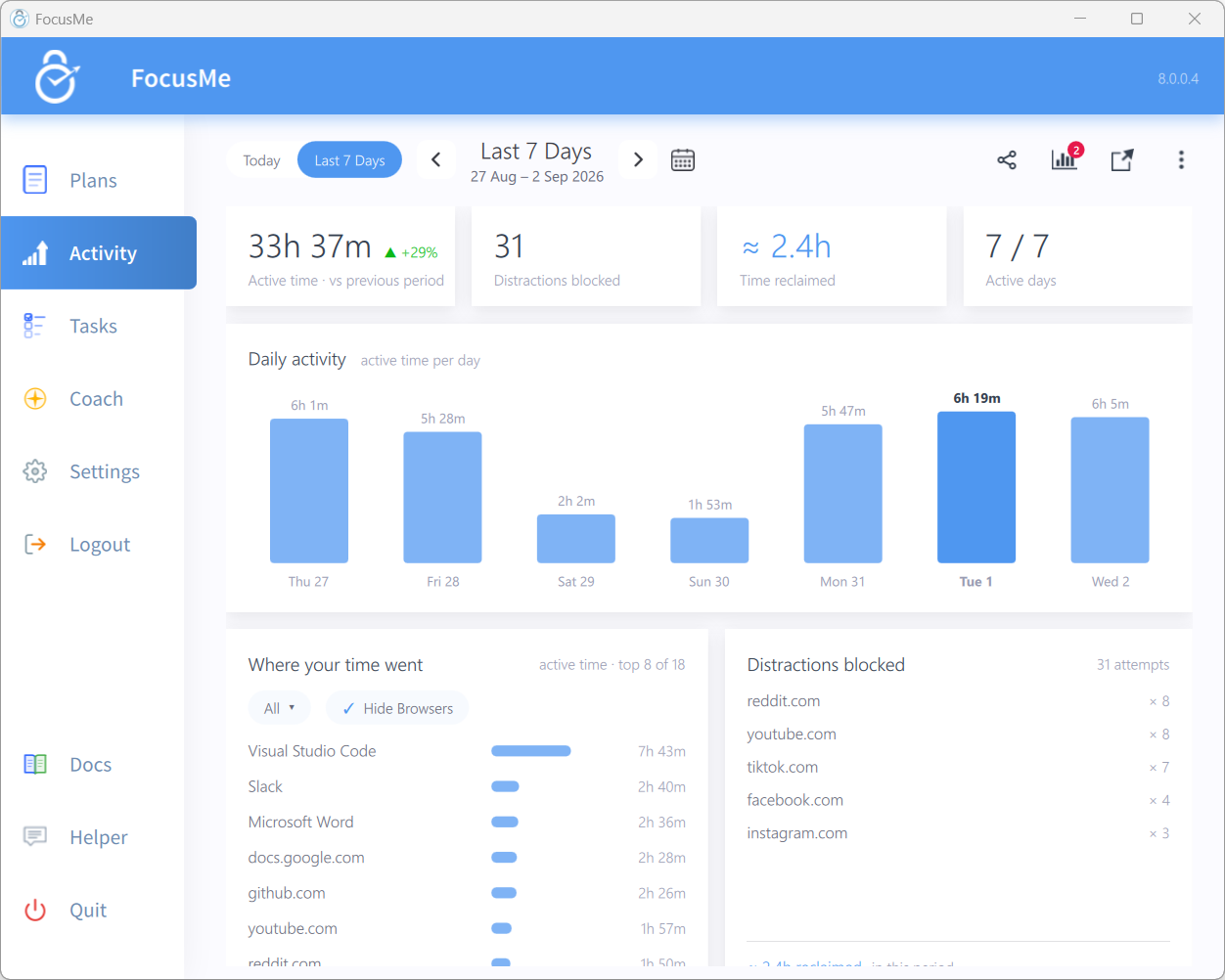
Think about the amount of time you lose just by casually browsing the web. It might not feel like much in the moment, but over time, these little distractions add up. When you use a website blocker for Windows, you’ll instantly notice that you can concentrate on your work for longer periods. FocusMe lets you block time-sucking websites and apps outright or limit how long you spend on them, helping you build focus over time.
Increased Productivity
When distractions are out of the way, your mind can focus on the task in front of you. You’ll be able to complete your work faster and with higher quality. Whether you’re writing, coding, or simply managing your to-do list, a website blocker for Windows helps you give your full attention to what’s important.
How to Set Up a Website Blocker for Windows
Getting started with a website blocker for Windows is easier than you might think. There are various apps and tools available, so you’ll want to choose one that suits your needs. Let’s go over some of the best options out there and how to set them up.
Blocking at the Network Level
Windows has no website blocker of its own. On Windows, FocusMe can block a site at the network level (its Network block option), so the page simply fails to load in every browser, with nothing to set up by hand.
Website Blocker Apps for Windows
The easiest way to block websites is a dedicated app. Here are some of the most popular options:
1. FocusMe
If you want the most comprehensive control across devices, FocusMe is the go-to solution. On Windows it blocks websites in every browser, including Chrome, Edge, Firefox and Brave, and it blocks desktop apps too. It also runs on Mac, Linux, Android and iPhone, so your plans follow you wherever you work. See FocusMe for Windows.
2. Cold Turkey
Cold Turkey is a popular website blocker for Windows that allows you to block distracting sites for a set period. Whether you want to block social media during work hours or create a customized block list, Cold Turkey has you covered.
3. Freedom
Freedom is another great tool that helps you stay focused by blocking websites and apps on your Windows desktop. You can set up recurring block sessions, so you don’t even have to think about it. Just schedule a time, and Freedom will automatically block the websites you’ve selected.
Blocking Desktop Apps on Windows
Another great feature of some website blockers for Windows is the ability to block apps on your desktop. This can be helpful if you find yourself constantly checking your messaging apps, games, or even productivity tools that cause distractions.
For example, you can use apps like FocusMe or Cold Turkey to block both websites and desktop apps, keeping you on task without worrying about desktop notifications or being tempted to open a game.
Benefits of Using a Website Blocker for Windows
Using a website blocker for Windows comes with several benefits that will help you stay productive, focused, and organized. Here’s why you should consider using one today.
Better Time Management
Time management is a struggle for many people, especially when distractions are at every turn. A website blocker for Windows ensures that you can manage your time better by restricting your access to non-essential websites during work hours. This results in a more structured and effective day.
Improved Mental Well-being
Constant distractions can cause mental exhaustion. You might find yourself stressed out by the never-ending flow of information. By blocking out the distractions and setting clear work periods, you give yourself the mental space to focus, think clearly, and relax without feeling overwhelmed.
Developing Better Habits
Using a website blocker for Windows can also help you break bad habits. For instance, if you’ve been trying to cut down on social media usage or stop browsing irrelevant websites, a blocker can force you to stay away from these habits. Over time, you’ll notice yourself becoming more disciplined in your online habits.
Customizing Your Website Blocker for Windows
One of the great things about using a website blocker for Windows is that you can often customize it to fit your specific needs. Whether you want to block websites for a certain amount of time each day or schedule your blocks around certain hours, most website blockers give you plenty of flexibility.
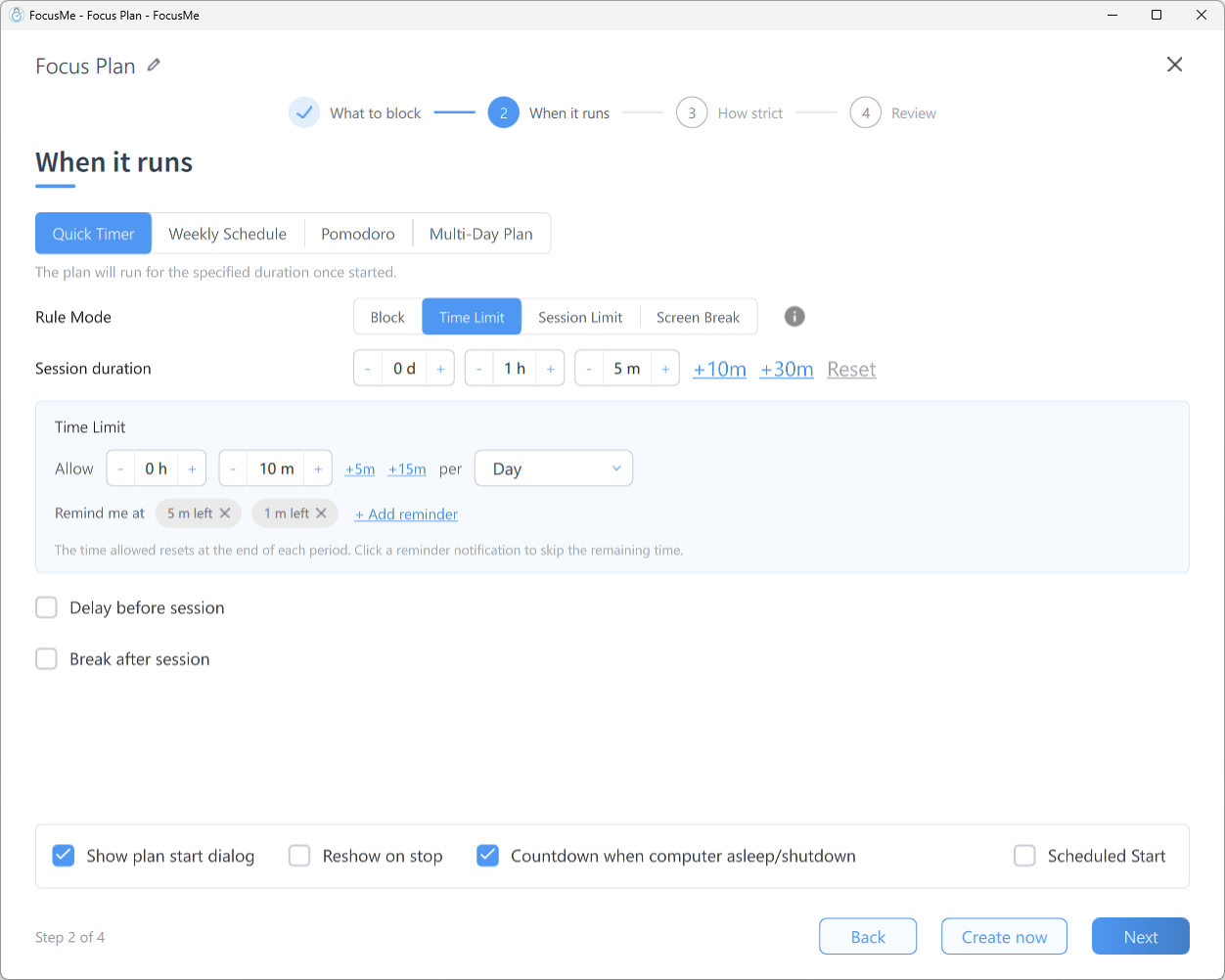
Here are a few ways to customize your blocker:
-
Set Time Limits: Limit how much time you can spend on a particular website. Once you reach the time limit, the website is blocked for the rest of the day.
-
Create Blocked Schedules: You can create a schedule to block certain websites during specific hours of the day. For example, you might want to block social media from 9 AM to 5 PM when you’re working, and allow access in the evenings.
-
Allow Exceptions: Some website blockers for Windows allow you to set exceptions for certain websites. For example, you can block all social media, except for LinkedIn, if you use it for professional purposes.
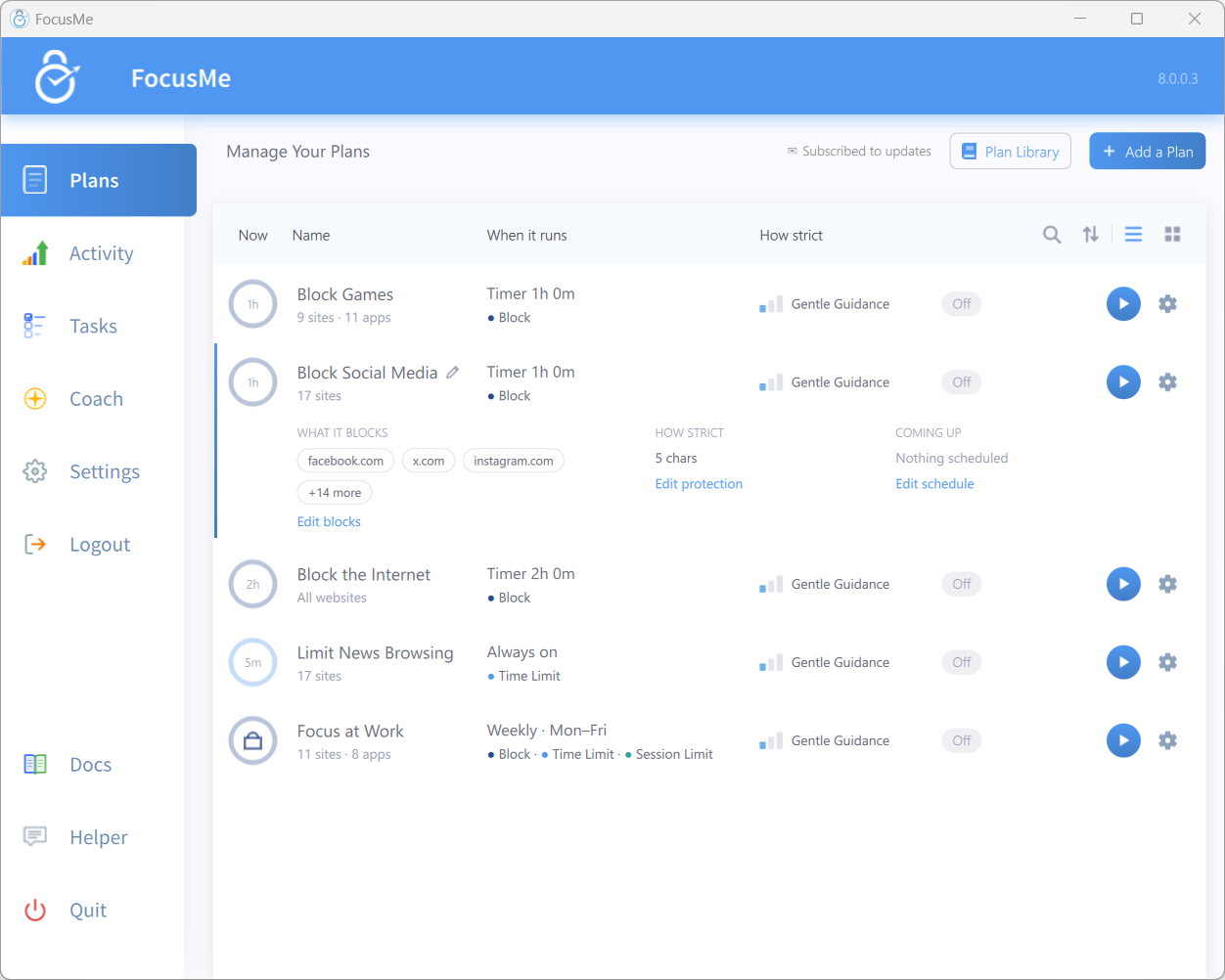
FocusMe covers all three. A Time Limit gives a daily budget; a Session Limit caps how many times you open it and how long each visit lasts, with a wait between. Plans run on a Weekly Schedule or a Quick Timer, and an allow list keeps the sites you need open.
Overcoming Challenges with Website Blockers for Windows
While website blockers are incredibly helpful, you might run into a few challenges. The most common challenge is the temptation to bypass the block. Many users might try to disable or remove the block to access restricted sites. Some blockers let you lock a block in place. In FocusMe, Enforced Mode means the plan runs to its end; while it runs it cannot be stopped or weakened, only made stricter. Here are some more tips to help you overcome that challenge:
Stay Accountable
One of the best ways to make a website blocker for Windows work for you is to stay accountable. Tell a friend or family member about your goals to stay focused and ask them to check in on your progress. Knowing that someone else is watching can help you stay on track. FocusMe can build this in: add an accountability partner, and stopping, pausing or loosening a protected plan can need their approval.
Start Small
If you’re not used to having websites blocked, start with just a few sites or limit your blocks to certain times of the day. Gradually increase the number of blocked websites and extend the blocking periods as you get used to it.
Don’t Be Too Hard on Yourself
If you slip up and visit a blocked site, don’t be too hard on yourself. The goal is to improve, not to be perfect. Learn from your mistakes, adjust your settings if needed, and keep going.
Block distracting websites in just a few steps!
Taking control of your time is one of the best things you can do for your productivity and mental well-being. A website blocker for Windows is a powerful tool that helps you stay focused, avoid distractions, and accomplish more. Whether you’re working, studying, or trying to break bad online habits, a website blocker for Windows can make all the difference.
Among all the tools available, FocusMe stands as the most comprehensive solution to digital distraction. With cross-platform support, deep customization, habit-building features, and a 60-day unconditional money-back guarantee, it’s designed for people serious about staying productive.
Ready to stop wasting time and start hitting your goals? Try FocusMe risk-free with our 60-day money-back guarantee. Because your time is too valuable to waste.
FocusMe
Make the focused hour the normal one
Block the sites and apps that pull you off track, on a schedule or a timer, on Windows, Mac, Linux, Android and iPhone.
Start your free 14-day trialNo credit card needed.
Frequently Asked Questions
How does a website blocker for Windows improve productivity?
By blocking access to distracting websites, a website blocker for Windows helps you stay on task. With fewer distractions, you can focus better on your work, accomplish tasks faster, and feel more productive throughout the day.
Can I block apps along with websites using a website blocker for Windows?
Yes! Many website blockers for Windows also allow you to block desktop apps, helping you avoid distractions from games, messaging apps, and other non-essential software during work hours.
Are there any free website blockers for Windows?
Yes, some blockers have free versions with fewer features. FocusMe is a paid app with a 14-day free trial that gives full access to every feature, so you can try it before you buy; see pricing.
How can I bypass a website blocker for Windows?
Although website blockers are designed to prevent access to certain websites, users may try to bypass them by disabling the software or changing settings. To prevent this, some apps offer additional features like password protection or restrictions on changing settings.
Can a website blocker for Windows be customized to my needs?
Yes, many website blockers allow customization. You can set schedules for when websites are blocked, specify which websites or apps are restricted, and even set time limits on how long you can spend on specific websites. This makes the blocker more adaptable to your work routine.
Can I block only certain websites while keeping others accessible?
Yes, with a website blocker for Windows, you can create customized lists of sites to block or allow. This way, you can prevent access to distracting websites while still allowing access to those you need for work or study.
Will the website blocker work if I use different browsers like Chrome or Edge?
Absolutely. A website blocker for Windows can be configured to block sites across multiple browsers. Once activated, it restricts access regardless of whether you are using Chrome, Edge, Firefox, or another browser installed on your system.
Can I set schedules for when websites are blocked?
Yes, most website blockers allow you to create schedules. You can choose specific hours or days when access to certain sites is restricted, helping you build productive routines without permanently blocking content.
Can I bypass the website blocker if I really need to access a site?
Most blockers offer strict protection to prevent bypassing. However, some tools allow you to set up temporary overrides with passwords or timers. This ensures you stay accountable while giving you control when necessary.
Is my browsing history affected when using a website blocker?
No, website blockers do not interfere with your browsing history. They simply prevent access to selected websites, allowing you to continue using your browser normally for permitted sites. Your history is not deleted or changed.
Want to talk it through? Join the FocusMe community