Prefer to read offline? Download this article as a PDF
Distracted by social media, YouTube, or news sites when you should be working? A website blocker can help. We tested the most popular options and ranked them based on blocking power, bypass resistance, features, and value for money. Updated for 2026. Whether you’re a student cramming for exams, a professional trying to hit deadlines, or someone battling a screen addiction, here are the best website blockers available right now.
1. FocusMe – Best Website Blocker
Platforms: Windows, macOS, Linux, Android, iPhone
Price: 14-day free trial, no card needed. Current plans are on our pricing page. 60-day money-back guarantee.
FocusMe is the most feature-complete website and app blocker on the market. It blocks websites across all browsers simultaneously, no switching to Chrome to get around a Firefox block. It also blocks desktop applications, games, and even specific Windows processes.
FocusMe
Block the sites and apps that pull you off track, on a schedule or a timer, on your computer and phone.
Try it free for 14 daysWhat sets FocusMe apart is Enforced Mode. Enforced Mode means the plan runs to its end; while it runs it cannot be stopped or weakened, only made stricter. If you want a gentler safeguard, a plan can instead ask for a password, a string of random characters or a wait before it stops.
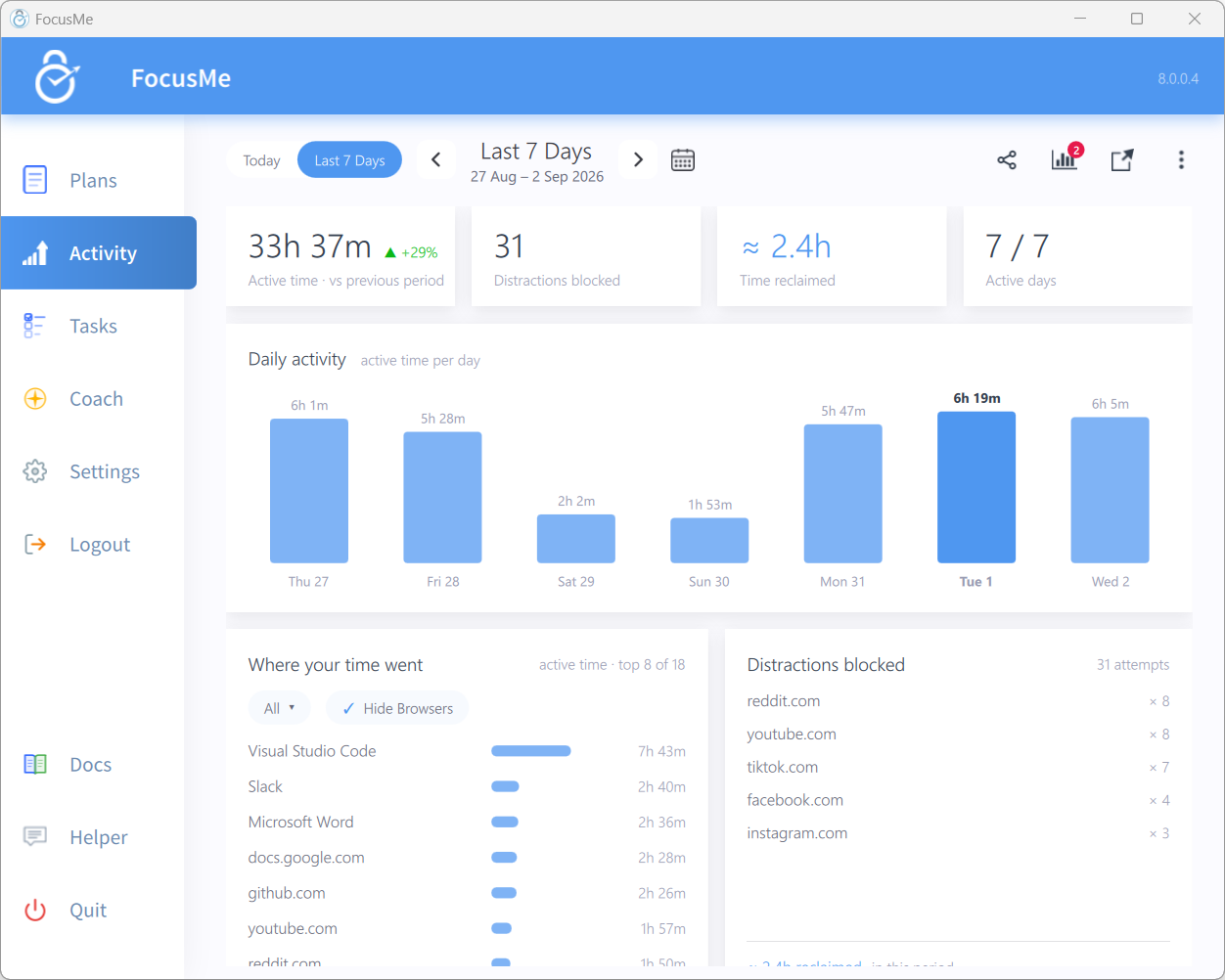
Beyond blocking, FocusMe includes per-site and per-app time limits (e.g. “30 minutes of YouTube per day”), a Weekly Schedule, Pomodoro timing with enforced screen breaks, an Activity view of where your time goes, Tasks, and an AI Coach.
Why we rank it #1: No other blocker combines this level of blocking power with this many features. If you’ve tried other blockers and found them too easy to bypass, FocusMe is designed specifically for that problem.
Pros:
- Blocks websites across all browsers + apps and games
- Enforced Mode: the plan runs to its end
- Per-site time limits, scheduling and Pomodoro timing
- Enforced screen breaks to protect your eyes and posture
- AI Coach
- Android and iPhone apps, with plans synced between your devices
- CLI automation for power users
- Uninstall protection
- World-class customer support
Cons:
- Not free, but offers a 14-day trial and 60-day money-back guarantee
2. Cold Turkey – Best One-Time Purchase
Platforms: Windows, macOS
Price: Free version available. Pro: one-off purchase (price on getcoldturkey.com), 7-day Pro trial.
Cold Turkey is a well-regarded website and app blocker with a simple one-time price. The Pro version includes app blocking, weekly schedules, password protection, time allowances, Pomodoro blocks, and usage statistics. Its blocking is effective and hard to bypass, and you can make a block harder to end with a typed-text or delay challenge.
If you’re looking for a strong website blocker without a monthly subscription, Cold Turkey Pro is a good choice.
Pros:
- One-time purchase, no subscription
- Blocks websites and applications
- Password protection
- Time allowances and Pomodoro blocks (Pro)
- Usage statistics
- Strong bypass prevention
Cons:
- No mobile app (desktop only)
- No enforced screen breaks
- No AI features or CLI automation
- Free version is very limited
Read our full FocusMe vs Cold Turkey comparison →
3. Freedom – Best for Cross-Device Sync
Platforms: Windows, macOS, iOS, Android, Chrome extension (Linux via extension)
Price: Free plan. Premium from $3.33/month billed yearly or $8.99 monthly, or a one-off Forever plan. 7-day free trial.
Freedom is the go-to choice if you need a website blocker across iOS, Android, and desktop devices. It syncs blocking sessions across all your devices, so starting a block on your laptop also blocks your phone. It’s simple to set up and has a clean, user-friendly interface, making it one of the best options for cross-device productivity.
Freedom works well for basic website blocking. However, its blocking relies on browser extensions for websites (which can be disabled), and it requires an internet connection for session management. Even so, Freedom remains a popular choice for users who prioritize mobile support and synchronization.
Pros:
- iOS and Android support
- Cross-device sync
- Clean, simple interface
- Ambient sounds feature
- Locked Mode (Premium) for stronger enforcement
Cons:
- Browser extension can be disabled to bypass blocking
- Requires internet connection
- Limited app blocking compared to dedicated desktop blockers
- No per-site time limits (all or nothing)
- No Pomodoro timer or screen breaks
Read our full FocusMe vs Freedom comparison →
4. SelfControl – Free and Simple for Mac
Platforms: macOS only
Price: Free (open source)
SelfControl is a simple, powerful, and completely free website blocker for Mac. You add sites to a block list, set a timer, and hit start. Once active, the block is extremely hard to bypass: it survives restarts, and even deleting the app won’t remove the block.
The downside is that it’s very basic. No app blocking, no scheduling, no time limits, no customization. You set a timer and that’s it. But for Mac users who just need a straightforward “block these sites for 2 hours” tool, SelfControl is hard to beat.
Pros:
- Completely free and open source
- Extremely strong enforcement – survives restarts and deletion
- Dead simple to use
Cons:
- macOS only – no Windows, Linux, or mobile
- Website blocking only, no app or game blocking
- No scheduling, time limits, or recurring blocks
- No password protection or break reminders
- Timer-based only, can’t set “30 min/day on Reddit”
Read our full FocusMe vs SelfControl comparison →
5. LeechBlock NG – Best Free Browser Extension
Platforms: Firefox, Chrome (any OS that supports those browsers)
Price: Free
LeechBlock NG is a free browser extension that punches above its weight. It supports up to 30 different “block sets” with independent schedules and time limits. You can block sites on a schedule (e.g. 9am to 5pm on weekdays) or set daily time budgets (e.g. 30 minutes on social media per day).
It also has a lockdown mode and password protection to prevent you from changing settings during a block. For a free tool, it’s impressively featured.
Pros:
- Completely free
- 30 block sets with independent schedules
- Per-site time limits
- Password protection and lockdown mode
- Works on Firefox and Chrome
Cons:
- Browser extension only, can be bypassed by switching browsers
- No app or game blocking
- No enforced mode (can disable the extension)
- No screen breaks or Pomodoro timer
- No mobile support
Read our full FocusMe vs LeechBlock comparison →
6. StayFocusd – Free Chrome Extension
Platforms: Chrome only
Price: Free
StayFocusd is a Chrome extension that limits how much time you can spend on distracting websites. Instead of blocking sites outright, you set a daily time allowance – once it’s used up, the site is blocked for the rest of the day.
It also has a “Nuclear Option” that blocks chosen sites for a set period with no way to undo it (within Chrome). It can block specific subdomains, pages, and even in-page content like videos.
Pros:
- Free
- Time-based allowances (not just on/off blocking)
- Nuclear Option for strong temporary blocking
- Can block specific page content (videos, images, etc.)
Cons:
- Chrome only, open Firefox and the block is gone
- No app or game blocking
- No password protection
- No enforced screen breaks
- No mobile support
- Extension can be disabled
Read our full FocusMe vs StayFocusd comparison →
7. RescueTime – Best for Time Tracking + Light Blocking
Platforms: Windows, macOS, Android, Linux
Price: Free Lite plan. Paid plans from $7/month billed yearly, or $9 monthly.
RescueTime is primarily a time tracking tool that also has some blocking features. It automatically tracks every app and website you use and gives you detailed productivity reports, scores, and trends. Its Focus Sessions feature (paid) blocks the sites and apps you have rated distracting while a session runs.
If your main goal is understanding where your time goes and you only need light blocking, RescueTime is excellent. But if you need strong, enforced blocking, it’s not the right tool – its blocks are easy to disable.
Pros:
- Best-in-class time tracking and analytics
- Automatic categorization of all activity
- Productivity scores and weekly reports
- AI assistant for insights
- Android app
- Linux support
Cons:
- Blocking is basic and easy to disable
- No Enforced Mode, password protection or uninstall protection
- No per-site time limits
- No enforced screen breaks
- Primarily a tracker, not a blocker
Read our full FocusMe vs RescueTime comparison →
8. Forest – Best for Gentle Motivation
Platforms: iOS, Android, Chrome and Firefox extension
Price: Free. Forest Plus subscription, price varies by region.
Forest takes a completely different approach. Instead of blocking, it motivates. You plant a virtual tree and it grows while you stay focused. Leave the app and the tree dies. It’s gamified, social, and even plants real trees through a partnership with Trees for the Future.
On your phone, Deep Focus blocks the apps outside your allow list while the timer runs, and Time Guard schedules recurring blocks (one app or site on the free plan, more with Forest Plus). But you can still give up your tree and leave, and on a computer there is only the browser extension. It’s best for people who respond to gentle motivation rather than enforced restriction.
Pros:
- Fun, gamified approach to focus
- Plants real trees (partnership with Trees for the Future)
- Social features, focus with friends
- iOS and Android apps
- Free, with app blocking on your phone
Cons:
- No enforced mode (you can give up the tree and leave)
- No desktop app (browser extension only)
- Website blocking is limited to Time Guard and the extension
- No daily time limits or screen breaks
- Relies on willpower, which defeats the purpose for many users
Read our full FocusMe vs Forest comparison →
9. Covenant Eyes – Best for Accountability and Content Filtering
Platforms: Windows, macOS, iOS, Android
Price: $18/month or $198/year, up to 10 people.
Covenant Eyes, whose app is now called Victory, is designed for a specific purpose: filtering adult content and providing accountability reports to a trusted partner. It uses AI-powered screen monitoring to detect inappropriate content and sends reports to your chosen accountability partner.
It’s not a general-purpose productivity blocker, it’s purpose-built for content filtering and accountability. If that’s what you need, it’s one of the best tools for families, accountability groups, and individuals seeking stronger content monitoring. For general productivity blocking, look elsewhere.
Pros:
- AI-powered content detection
- Accountability partner reporting
- Works across all major platforms
- Uninstall protection
- Scheduling on desktop
Cons:
- Not designed for productivity, focused on content filtering
- More expensive than general blockers
- Privacy concerns with screen monitoring
- No per-site time limits or Pomodoro timer
- No app blocking for productivity purposes
- No enforced screen breaks
Read our full FocusMe vs Covenant Eyes comparison →
Quick Comparison Table
| Blocker | Website Blocking | App Blocking | Enforced Mode | Time Limits | Screen Breaks | Mobile | Price |
|---|---|---|---|---|---|---|---|
| FocusMe | ✓ All browsers | ✓ | ✓ | ✓ | ✓ | iPhone + Android | See pricing |
| Cold Turkey | ✓ All browsers | ✓ (Pro) | ✓ | Allowances (Pro) | ✗ | ✗ | One-off (Pro) |
| Freedom | ✓ Via extension | Partial | Locked Mode (Premium) | ✗ | ✗ | iOS + Android | Free / from $3.33/mo |
| SelfControl | ✓ | ✗ | ✓ Very strong | ✗ | ✗ | ✗ | Free |
| LeechBlock NG | ✓ One browser | ✗ | ✗ | ✓ | ✗ | ✗ | Free |
| StayFocusd | ✓ Chrome only | ✗ | Nuclear Option | ✓ | ✗ | ✗ | Free |
| RescueTime | ✓ Basic | Basic | ✗ | Category-based | ✗ | Android | Free / from $7/mo |
| Forest | Limited | Phone only | ✗ | ✗ | ✗ | iOS + Android | Free / Plus |
| Covenant Eyes | ✓ Content filter | ✗ | ✗ | ✗ | ✗ | iOS + Android | $18/mo |
How to Choose the Right Website Blocker
The best blocker depends on your situation:
- If you need serious blocking you can’t bypass: FocusMe or Cold Turkey. Both have enforced modes. FocusMe has more features; Cold Turkey has a simpler pricing model.
- If you need blocking on your phone as well as your computer: FocusMe or Freedom. Both sync across your devices.
- If you want free and simple (Mac): SelfControl, brutally effective, zero cost.
- If you want free and simple (any browser): LeechBlock NG, best free extension with time limits.
- If you mostly need time tracking: RescueTime, excellent analytics, light blocking.
- If you want gentle motivation, not hard blocks: Forest, fun gamification approach.
- If you need content filtering and accountability: Covenant Eyes, purpose-built for that.
Our Recommendation
If you’re reading a “best website blocker” article, chances are you’ve already tried willpower and it hasn’t worked. That’s normal, it’s not a character flaw, it’s how our brains respond to infinite distraction.
The free options (SelfControl, LeechBlock, StayFocusd) are great starting points. But if you find yourself bypassing them, switching browsers, disabling extensions, or just waiting out the timer, you need something stronger.
That’s where FocusMe comes in. It’s the only blocker that combines all-browser website blocking, app blocking, Enforced Mode, per-site time limits, screen breaks, and mobile support in one package. And with a 14-day free trial and a 60-day money-back guarantee, there’s zero risk in trying it.
FocusMe
Make the focused hour the normal one
Block the sites and apps that pull you off track, on a schedule or a timer, on Windows, Mac, Linux, Android and iPhone.
Start your free 14-day trialNo credit card needed.
FAQs (Frequently Asked Questions)
What is the best free website blocker?
FocusMe offers a generous 14-day free trial with full access to every feature, website blocking across all browsers, app blocking, Enforced Mode, screen breaks, and more. If you’re looking for a permanently free option, tools like LeechBlock and SelfControl exist, but they’re limited to a single browser or platform and lack app blocking, enforced mode, and most advanced features. Most people find the free options too easy to bypass.
What is the hardest website blocker to bypass?
FocusMe’s Enforced Mode is the hardest to bypass. It works across all browsers and applications simultaneously, with password protection, random character challenges, stop delays, and uninstall protection. Other tools like SelfControl are hard to bypass within their limited scope (websites only, Mac only), but FocusMe is the only blocker that combines strong enforcement with full coverage across browsers, apps, and platforms.
Do website blockers actually work?
Yes, but only if you can’t easily bypass them. Free browser extensions can be disabled or bypassed by switching browsers, which is why many people give up on them. FocusMe solves this with Enforced Mode: the plan runs to its end; while it runs it cannot be stopped or weakened, only made stricter. That’s why it works where other tools fail.
Can I block websites on my phone?
Yes. FocusMe has apps for Android and iPhone that block websites and apps, and your plans sync between your computer and your phone. Most other blockers in this list cover only the computer or only the phone. If you need both from one tool, FocusMe is the best option.
What’s the difference between a website blocker and a content filter?
A website blocker like FocusMe lets you choose exactly which sites and apps to block and when, giving you full control over your digital environment. A content filter like Covenant Eyes automatically detects and blocks categories of content. FocusMe is the better choice for productivity, studying, and beating procrastination: it gives you precise control with strong enforcement.
Can my employer use a website blocker for my team?
Yes. Our B2B product ReclaimTime is built specifically for teams and organizations: it lets administrators set and enforce blocking policies centrally. FocusMe itself is designed for individual use, but it’s the most powerful option for personal productivity. Free tools like SelfControl and StayFocusd can’t be managed centrally at all.
Want to talk it through? Join the FocusMe community