Most people do not want Instagram gone. They want the Reels tab gone, or the 11pm scroll gone, or the lunch-break check to stay a lunch-break check. The built-in tools are made for reminders, not for that. Here is what each one does, where it stops, and how a FocusMe plan blocks exactly the part of Instagram you choose, when you choose.
The manual ways, and where they fall down
Instagram’s daily limit
Under your profile, Your activity, then Time spent, Instagram offers a daily limit and a break reminder. When you reach the limit a notice appears. You tap it away. That is the whole mechanism, and Instagram says as much: it is a reminder. Quiet mode, in the same area, silences notifications for a window you set, which is useful for sleep and does nothing about opening the app yourself.
Deactivating or deleting the app
Temporary deactivation lasts until the next time you log in, which is the problem restated. Deleting the app leaves instagram.com working in every browser, with Reels included.
Screen Time and Digital Wellbeing
An app limit on Instagram, in iPhone Screen Time or Android’s Digital Wellbeing, is protected by a passcode you set and an “ignore limit for today” button. It helps on a child’s phone where a parent keeps the passcode. On your own phone it lasts as long as you let it.
The hosts file on a computer
A line sending instagram.com and www.instagram.com to 127.0.0.1 in the hosts file (Windows: C:\Windows\System32\drivers\etc\hosts; Mac: /etc/hosts) blocks the site in every browser on that computer. It needs administrator rights, it cannot block only Reels or only the evening, the same edit undoes it, and it does not touch the phone.
Block Instagram with FocusMe
FocusMe blocks apps and websites on Android and iPhone, and on Windows, Mac and Linux, with one account that syncs the plan between them.
Only Reels
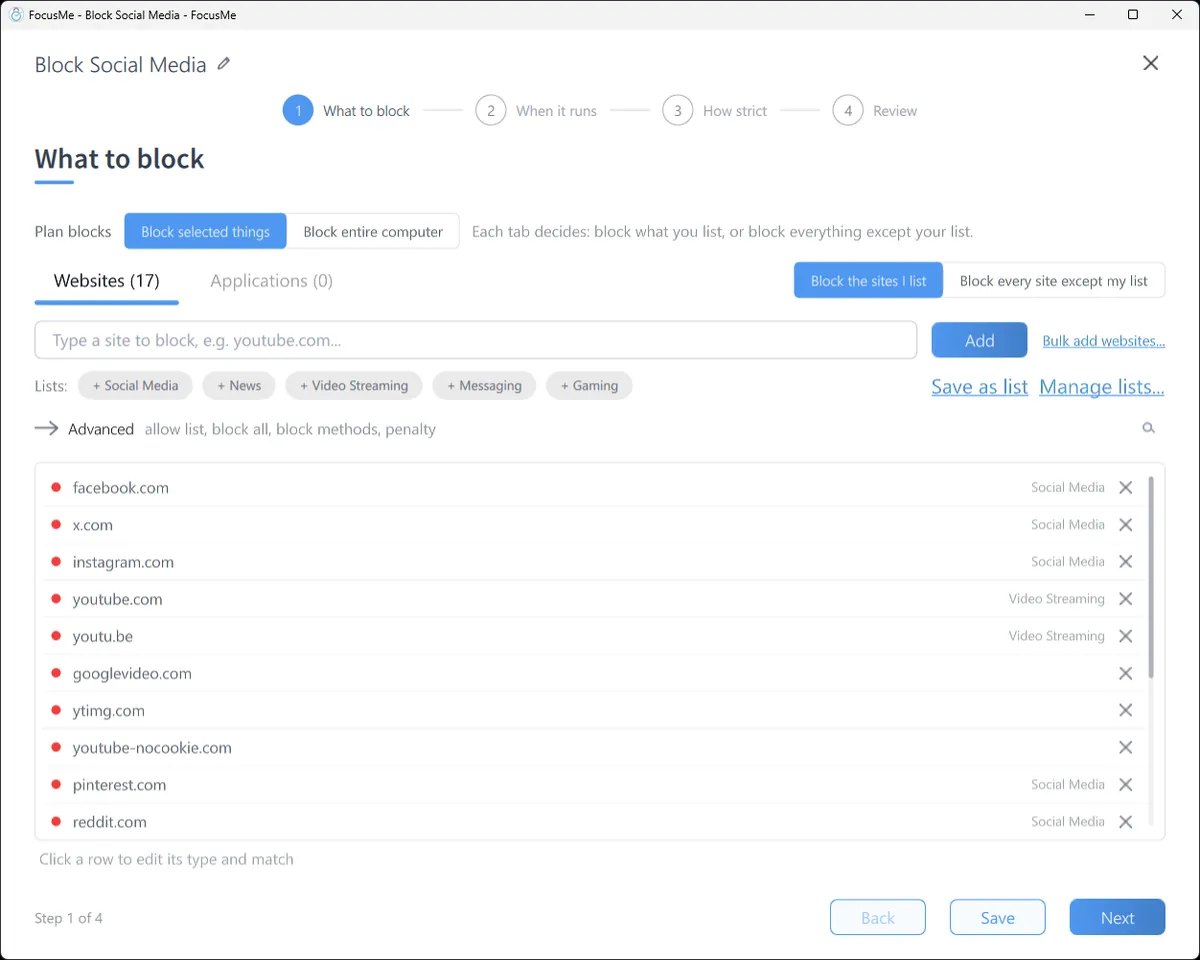
On a computer, add instagram.com/reels on the What to block step. The entry includes the path, so the Reels feed is blocked while profiles, messages and the main feed work. For Reels that appear elsewhere, add a second entry, Reels, and set its type to Address or page title. Pair it with youtube.com/shorts and facebook.com/reel and one plan covers every short-video feed.
All of Instagram, but keep messages
Add instagram.com to the block list, then switch to Allowed and add instagram.com/direct. Allowed entries always take priority, so the inbox works and the feed does not. Turn on Similarity protection in the Advanced panel so the allow list cannot be stretched into the rest of the site.
On your phone
On Android, pick Instagram from the app list and add instagram.com as a website. Links opened inside Facebook and Messenger are checked too. On iPhone, pick the Instagram app or the whole Social category in one tap; iOS Screen Time enforces the plan, so it keeps working when FocusMe is closed. The phone apps block the app as a whole; the “keep messages” trick is a computer feature.
A budget instead of a ban
On When it runs, choose Time Limit and allow 20 minutes a day. FocusMe counts the time you actually spend on Instagram and blocks it when the budget is spent, until tomorrow. A Session Limit of three visits of ten minutes, with a wait between, keeps the quick check quick.
Make it stick
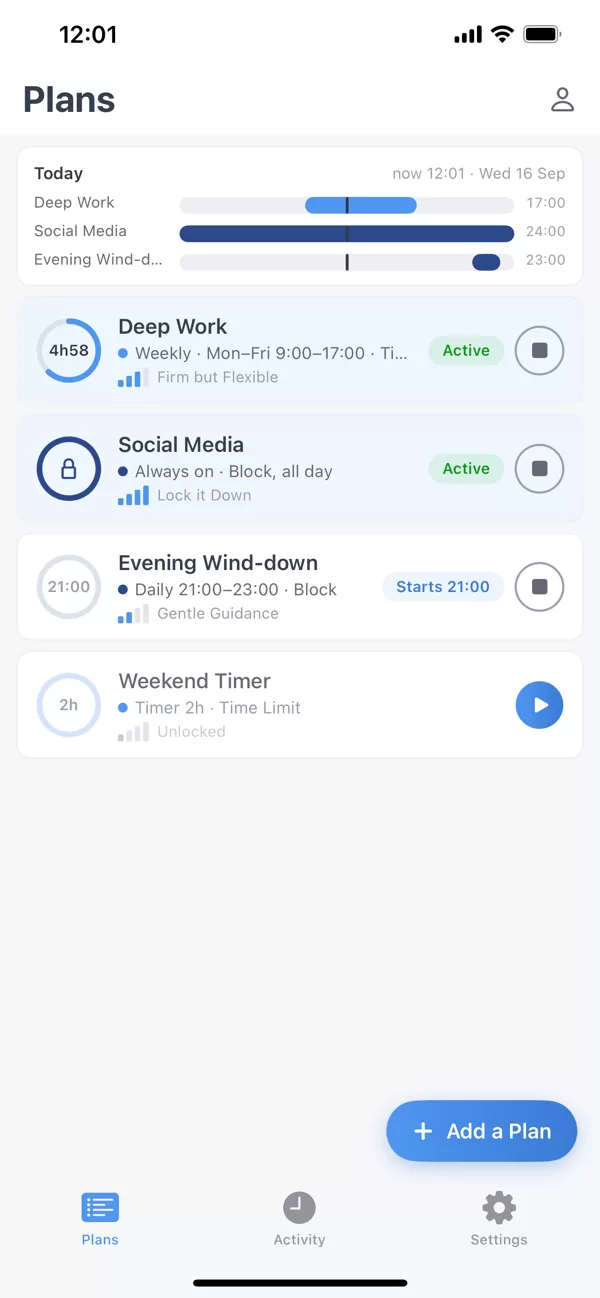
Put it on a schedule. A weekly schedule that blocks Instagram from 9 to 5 on weekdays and from 10pm every night runs by itself. The decision is made once; the evening holds no debate.
Pick how strict. Gentle Guidance asks for five random characters before a plan stops. Firm but Flexible adds a wait and a few pauses a day on the desktop, or 20 perfect characters on the phone. Lock it Down gives you no easy way out until the plan ends.

Or commit. On the desktop, Enforced Mode means the plan runs to its end and can only be made stricter while it runs. It suits the person who has tested the plan for a week on Lock it Down and knows it is right. The reward is that Instagram stops being a question you answer thirty times a day.
Frequently asked questions
Can I block Instagram Reels but keep the rest?
Yes, on a computer: add instagram.com/reels to a FocusMe plan. The feed, profiles and messages keep working.
Can I block Instagram in every browser?
Yes. A plan applies to Chrome, Edge, Firefox, Brave and Safari on a Mac, private windows included, and to every browser on an Android phone.
Can I block Instagram only at night?
Yes. Draw the evening block on the weekly schedule, 10pm to 7am on every day, and the plan starts and ends on time without you.
Can my accountability partner hold the key?
Yes. On the desktop, an accountability partner can approve a stop instead of a typing challenge, so a plan can be strict for you and still have a human in the loop.
Related: Break a social media habit, Stop scrolling at night, Block YouTube Shorts and Facebook Reels.