

Android 8 ou version ultérieure
Le bloqueur d'applications et de sites web pour Android
Bloquez les applications et sites web sources de distraction sur votre téléphone, selon un horaire que vous définissez, grâce à une protection qui reste efficace même lorsque la volonté flanche. Chrome, Samsung Internet, Firefox et toutes les autres applications sont concernées.
Téléchargement gratuit. Aucun compte requis. Android 8.0 ou version ultérieure.

Que bloquer
Applications
Choisissez une application parmi toutes celles installées sur votre téléphone : Instagram, TikTok, YouTube, un jeu, une application de shopping. Ouvrez-en une pendant qu’un forfait est en cours et vous vous retrouvez sur l’écran de blocage FocusMe, affichant le nom du forfait qui vous a interrompu.
Sites Web, dans tous les navigateurs
Saisissez les sites que vous souhaitez bloquer. Le blocage est actif sur Chrome, Samsung Internet, Firefox, Edge, Opera et Brave, ainsi que dans les navigateurs intégrés à Facebook, Messenger et Instagram ; un lien dans un flux est donc également pris en compte.

Quand il fonctionne
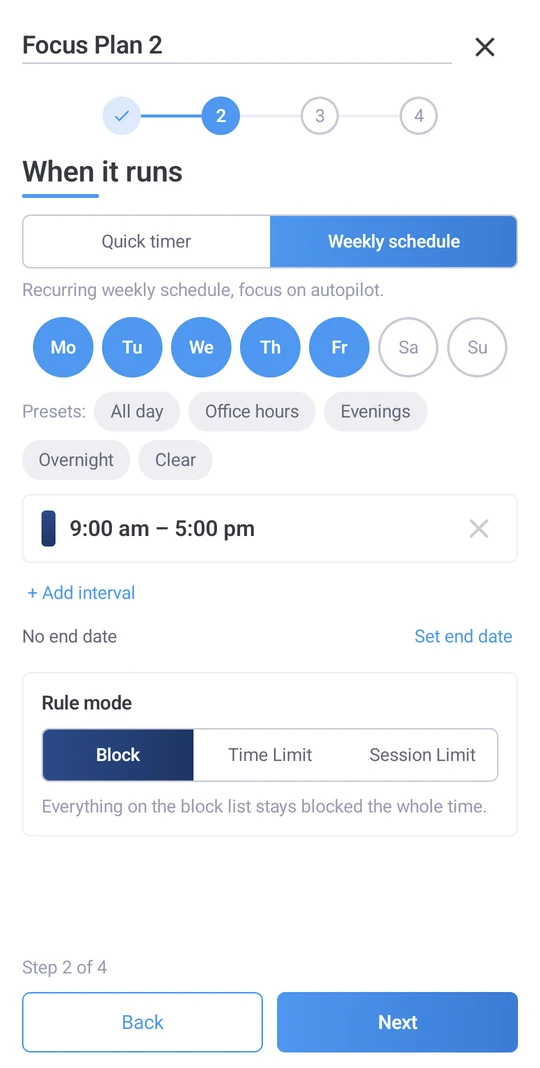
Des horaires et des délais qui s'autogèrent
Un minuteur pour l'heure qui suit. Un planning hebdomadaire, nuit comprise : une programmation « Coucher » à partir de 23 h pour que le téléphone redevienne un téléphone le matin. Ou un budget plutôt qu'une interdiction : 30 minutes de réseaux sociaux par jour, trois courtes sessions avec des pauses, et une limite au nombre d'ouvertures de chaque application.
Vous programmez un planning une seule fois et il se déroulera sans problème, que vous y pensiez ou non. La barre « Aujourd'hui » en haut de l'application « Plans » indique les activités en cours et celles à venir. Un planning annulé est signalé, vous évitant ainsi les mauvaises surprises.
Quelle rigueur
D'un coup de pouce pour verrouiller
Quatre niveaux. Les blocages non verrouillés restent inchangés, mais l'arrêt se fait d'un simple clic. Le mode « Guidance douce » vous demande de saisir cinq caractères aléatoires avant l'arrêt du plan : une décision, pas un réflexe. Le mode « Ferme mais flexible » exige la saisie de 20 caractères parfaits. Le mode « Verrouillage total » vous empêche d'interrompre le plan jusqu'à son terme. Chaque téléphone conserve ses propres paramètres de protection ; un plan synchronisé depuis votre ordinateur peut donc être plus strict sur celui-ci et plus souple sur celui-là, ou inversement.

Conçu pour Android
Chaque navigateur
Chrome, Samsung Internet, Firefox, Edge, Opera, Brave.
Navigateurs intégrés
Les liens ouverts dans Facebook, Messenger et Instagram sont vérifiés par rapport à vos sites bloqués.
La partie se poursuit après le redémarrage.
Un plan de cours reprend là où il s'était arrêté lorsque le téléphone redémarre.
Fonctionne hors ligne
Le blocage ne nécessite pas de connexion.
Configuration guidée
La première partie vous explique les deux autorisations nécessaires à FocusMe et pourquoi.
Aide depuis l'application
Demandez de l'aide pour élaborer un plan sans quitter FocusMe.
Voyez où sont passées les heures
L'onglet Activité affiche votre temps d'écran par application et les blocages effectués par FocusMe, ce qui vous permet de visualiser l'habitude avant de la modifier.

Un seul compte, votre téléphone et votre ordinateur
Connectez-vous avec votre compte FocusMe et vos plans se synchroniseront avec votre ordinateur Windows, Mac ou Linux et votre autre téléphone. L'abonnement Premium est inclus avec chaque licence pour ordinateur, pour un maximum de 2 appareils mobiles. Vous n'avez pas d'ordinateur ? Abonnez-vous à Premium directement dans l'application. Le blocage, la planification et les limites de temps ne nécessitent pas de compte.
- Windows
- Mac
- Linux
- Androïde
- iPhone
Configuration requise et téléchargement
- Androïde
- 8.0 ou version ultérieure.
- L'obtenir
- Google Play. Téléchargement gratuit.
- Autorisations
- L'accessibilité et l'affichage par rapport aux autres applications sont demandés lors de la configuration guidée, avec la raison de chaque demande.
- Prime
- Synchronisation du forfait avec votre ordinateur. Incluse avec chaque licence de bureau (2 appareils mobiles), ou abonnez-vous via l'application.
Foire aux questions
Quelles versions d'Android FocusMe prend-il en charge ?
Android 8.0 et versions ultérieures, sur les téléphones de tous les fabricants.
Bloque-t-il les sites web dans Chrome et Samsung Internet ?
Oui. Chrome, Samsung Internet, Firefox, Edge, Opera et Brave, ainsi que les navigateurs intégrés à Facebook, Messenger et Instagram.
Puis-je limiter le temps au lieu de bloquer ?
Oui. Définissez une limite quotidienne ou horaire pour une application ou un site, un nombre de sessions avec des pauses entre elles, ou une limite sur le nombre de fois qu'une application s'ouvre.
Que se passe-t-il si j'essaie d'interrompre un projet avant son terme ?
Cela dépend du niveau de restriction choisi. En mode déverrouillé, l'arrêt se fait en un clic. Les modes « Guidance douce » et « Ferme mais flexible » proposent un défi de saisie. En mode verrouillé, l'arrêt est impossible avant la fin du plan.
Est-ce que ça se synchronise avec mon ordinateur ?
Oui, avec Premium : connectez-vous avec le même compte sur votre ordinateur et votre téléphone, et vos abonnements et activités seront synchronisés. Premium est inclus avec chaque licence pour ordinateur.
FocusMe est-il gratuit sur Android ?
Le téléchargement est gratuit et le blocage, la planification et les limites de temps ne nécessitent ni compte ni paiement. La version Premium ajoute la synchronisation avec votre ordinateur ; elle est incluse avec la licence de bureau ou disponible dans l’application.
Prêt à prendre le contrôle de votre téléphone ?
Téléchargez-le sur Google Play- Téléchargement gratuit
- Aucun compte requis
- Android 8.0 ou version ultérieure