

안드로이드 8 이상
안드로이드용 앱 및 웹사이트 차단 앱
스마트폰에서 방해가 되는 앱과 웹사이트를 원하는 시간에 차단하세요. 의지력으로 차단할 수 없을 때에도 강력한 보호 기능을 제공합니다. 크롬, 삼성 인터넷, 파이어폭스 등 모든 앱에서 사용 가능합니다.
무료 다운로드. 계정 필요 없음. 안드로이드 8.0 이상.

차단할 항목
앱
휴대폰에 있는 모든 앱(인스타그램, 틱톡, 유튜브, 게임, 쇼핑 앱 등) 중에서 하나를 선택하세요. 계획 실행 중에 앱 하나를 열면, 해당 계획의 이름과 함께 FocusMe 차단 화면이 나타납니다.
모든 브라우저에서 웹사이트
차단하고 싶은 사이트 주소를 입력하세요. 이 차단 기능은 Chrome, Samsung Internet, Firefox, Edge, Opera, Brave는 물론 Facebook, Messenger, Instagram에 내장된 브라우저에서도 작동하므로 피드에 있는 링크도 차단 대상에 포함됩니다.

실행될 때
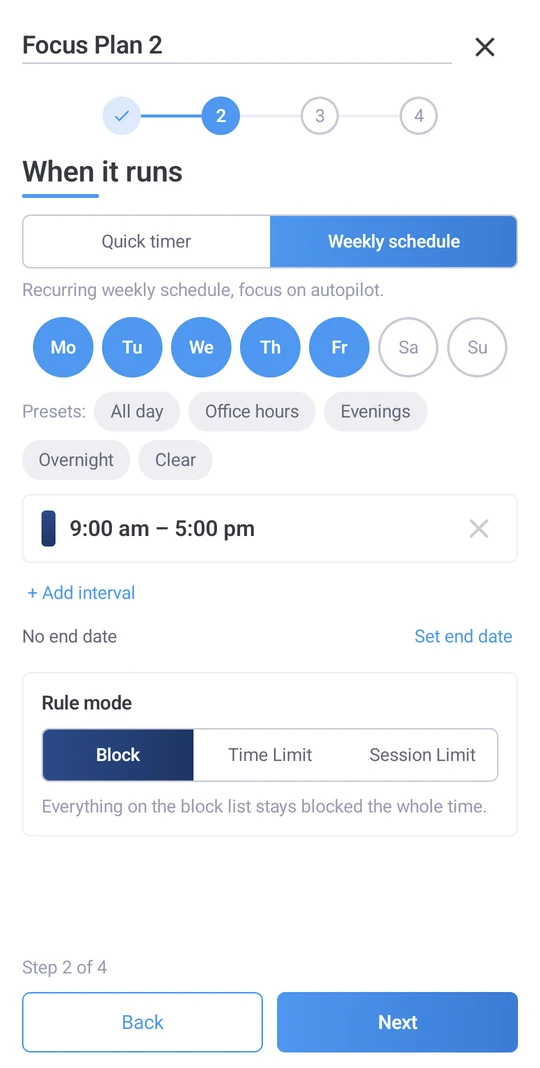
일정과 시간 제한이 자동으로 진행됩니다.
다음 한 시간을 위한 빠른 타이머. 밤 시간을 포함한 주간 일정: 밤 11시부터 취침 계획을 세워 아침에는 휴대폰을 다시 휴대폰으로 사용할 수 있도록 함. 또는 금지 대신 사용 시간 제한: 하루 30분 소셜 미디어 사용, 짧은 시간씩 세 번 사용 후 휴식 시간 갖기, 앱 실행 횟수 제한.
한 번 일정을 설정하면 기억하든 안 하든 계획은 정해진 시간에 시작하고 끝납니다. 계획 상단의 '오늘' 막대에는 현재 진행 중인 일정과 곧 시작될 일정이 표시되며, 오늘 취소된 일정은 그렇게 표시되므로 저녁에 예상치 못한 일이 발생하지 않습니다.
얼마나 엄격한가
가벼운 권유부터 완벽한 봉쇄까지
네 가지 레벨로 구성되어 있습니다. 잠금 해제된 블록은 이전과 동일하게 작동하지만, 한 번의 탭으로 중지할 수 있습니다. '부드러운 안내' 모드에서는 플랜이 중지되기 전에 임의의 문자 5개를 입력하도록 요청합니다. 이는 반사적인 입력이 아닌 신중한 판단을 요구합니다. '확실하지만 유연한' 모드에서는 20개의 문자를 완벽하게 입력해야 합니다. '완전히 잠금' 모드에서는 플랜이 종료될 때까지 중지할 방법이 없습니다. 각 휴대폰은 자체 보호 설정을 유지하므로 데스크톱에서 동기화된 플랜이 데스크톱에서는 더 엄격하게, 휴대폰에서는 더 부드럽게, 또는 그 반대로 적용될 수 있습니다.

안드로이드용으로 제작되었습니다
모든 브라우저
크롬, 삼성 인터넷, 파이어폭스, 엣지, 오페라, 브레이브.
앱 내 브라우저
페이스북, 메신저, 인스타그램 내에서 열리는 링크는 차단된 사이트 목록과 일치하는지 검사됩니다.
재시작 후에도 계속됩니다
실행 중이던 계획은 휴대전화가 다시 시작될 때 중단되었던 부분부터 다시 시작됩니다.
오프라인에서도 작동합니다
차단에는 연결이 필요하지 않습니다.
안내식 설정
첫 실행 시에는 FocusMe에 필요한 두 가지 권한과 그 이유에 대해 안내해 드립니다.
앱 내 도움말
FocusMe를 종료하지 않고도 계획 수립에 대한 도움을 요청하세요.
시간이 어디로 갔는지 확인해 보세요
활동 탭에는 앱별 화면 사용 시간과 FocusMe에서 차단한 시간이 표시되므로 습관을 바꾸기 전에 확인할 수 있습니다.

하나의 계정으로 휴대폰과 컴퓨터를 모두 사용하세요.
FocusMe 계정으로 로그인하면 플랜이 Windows, Mac 또는 Linux 컴퓨터와 다른 휴대폰에 동기화됩니다. 프리미엄 기능은 모든 데스크톱 라이선스에 포함되어 최대 2대의 모바일 기기에서 사용할 수 있습니다. 컴퓨터가 없으신가요? 앱에서 프리미엄을 구독하세요. 차단, 일정 및 시간 제한 기능은 계정 없이도 이용 가능합니다.
- 윈도우
- 스코틀랜드 사람
- 리눅스
- Android
- 아이폰
요구 사항 및 다운로드
- Android
- 8.0 이상 버전.
- 얻으세요
- 구글 플레이 스토어에서 무료로 다운로드할 수 있습니다.
- 권한
- 다른 앱보다 접근성 및 표시 권한을 우선적으로 사용하도록 설정할 때, 각 권한에 대한 이유를 묻는 메시지가 안내됩니다.
- 프리미엄
- 컴퓨터와 플랜을 동기화하세요. 모든 데스크톱 라이선스(모바일 기기 2대)에 포함되어 있으며, 앱에서 구독할 수도 있습니다.
자주 묻는 질문
FocusMe는 어떤 안드로이드 버전을 지원하나요?
안드로이드 8.0 이상 버전에서 사용 가능하며, 제조사에 관계없이 모든 휴대폰에서 사용 가능합니다.
크롬과 삼성 인터넷에서 웹사이트 접속을 차단하나요?
네. 크롬, 삼성 인터넷, 파이어폭스, 엣지, 오페라, 브레이브는 물론 페이스북, 메신저, 인스타그램에 내장된 브라우저도 포함됩니다.
차단하는 대신 시간 제한을 걸 수 있을까요?
네. 앱이나 사이트 사용 시간을 일일 또는 시간 단위로 설정하거나, 휴식 시간을 포함한 세션 횟수를 제한하거나, 앱 실행 횟수를 제한할 수 있습니다.
계획을 조기에 중단하려고 하면 어떻게 되나요?
선택한 엄격도에 따라 다릅니다. '잠금 해제'는 한 번 탭하면 멈춥니다. '부드러운 안내'와 '확고하지만 유연한'은 타이핑을 요구합니다. '완전 잠금'은 계획이 끝날 때까지 멈출 방법이 없습니다.
내 컴퓨터와 동기화되나요?
네, 프리미엄을 이용하시면 컴퓨터와 휴대폰에서 동일한 계정으로 로그인하고 요금제 및 활동 내역을 동기화할 수 있습니다. 프리미엄은 모든 데스크톱 라이선스에 포함되어 있습니다.
FocusMe는 안드로이드에서 무료로 사용할 수 있나요?
무료로 다운로드할 수 있으며, 차단, 예약 및 시간 제한 기능은 계정이나 결제 없이 이용 가능합니다. 프리미엄 버전은 컴퓨터와의 동기화 기능을 제공하며, 데스크톱 라이선스에 포함되어 있거나 앱에서 바로 사용할 수 있습니다.