

Android 8以降
Android向けアプリおよびウェブサイトブロッカー
設定したスケジュールに基づいて、スマートフォン上の集中を妨げるアプリやウェブサイトをブロックします。意志の力が尽きた時でも、その保護機能は維持されます。Chrome、Samsung Internet、Firefoxなど、あらゆるアプリに対応します。.
無料でダウンロードできます。アカウント登録は不要です。Android 8.0以降に対応しています。.

何をブロックするか
アプリ
スマートフォンにインストールされているすべてのアプリ(Instagram、TikTok、YouTube、ゲーム、ショッピングアプリなど)からどれでも選んでください。プラン実行中にいずれかのアプリを開くと、代わりにFocusMeのブロック画面が表示され、停止させたプランの名前が表示されます。.
ウェブサイトは、あらゆるブラウザで利用できます。
削除したいサイトを入力してください。このブロック機能は、Chrome、Samsung Internet、Firefox、Edge、Opera、Braveに加え、Facebook、Messenger、Instagramに組み込まれているブラウザにも対応しているため、フィード内のリンクもチェックされます。.

実行時
スケジュールと時間制限が自動的に実行される
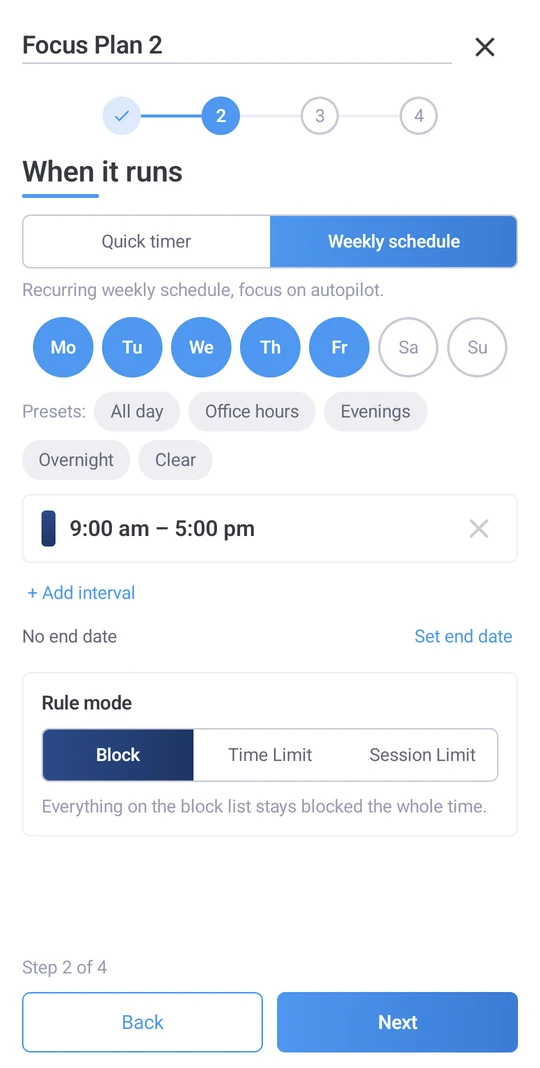
次の1時間のためのクイックタイマー。夜間を含む週ごとのスケジュール:午後11時から就寝までのプランで、朝には再び電話として使えるようにする。または、禁止ではなく予算を設定する:1日30分のソーシャルメディア利用、休憩を挟んだ3回の短いセッション、アプリの起動回数の制限。.
スケジュールを一度設定すれば、覚えていようがいまいが、計画は時間通りに開始・終了します。プラン画面上部の「今日」バーには、現在実行中のものと次に開始されるものが表示され、今日予定がキャンセルされている場合はその旨が表示されるので、夜に予期せぬ事態が発生することはありません。.
どれくらい厳しいか
ロックダウンへの後押し
4つのレベルがあります。ロック解除されたブロックは同じように機能しますが、停止するにはタップするだけです。ジェントルガイダンスでは、プランが停止する前にランダムな文字を5つ入力するように求められます。これは反射的な行動ではなく、判断です。ハード・バット・フレキシブルでは、20文字を完璧に入力するように求められます。ロック・イット・ダウンでは、プランが終了するまで停止する方法はありません。各端末は独自の保護設定を保持するため、デスクトップから同期されたプランは、デスクトップではより厳しく、端末ではより緩やかに、またはその逆になります。.

Android向けに構築
すべてのブラウザ
Chrome、Samsung Internet、Firefox、Edge、Opera、Brave。.
アプリ内ブラウザ
Facebook、Messenger、Instagram内で開かれたリンクは、ブロックされたサイトと照合されます。.
再起動後も継続する
実行中のプランは、スマートフォンが再び起動したときに、中断したところから再開されます。.
オフラインでも動作します
ブロッキングには接続は必要ありません。.
ガイド付きセットアップ
最初の実行では、FocusMeが必要とする2つの権限とその理由について説明します。.
アプリ内ヘルプ
FocusMeから離れることなく、プラン作成のサポートを依頼できます。.
時間がどこへ消えたのか見てみよう
「アクティビティ」タブには、アプリごとのスクリーンタイムとFocusMeが設定したブロックが表示されるので、習慣を変える前に現状を把握できます。.

アカウントは1つ、スマートフォンとコンピューター
FocusMeアカウントでサインインすると、プランがWindows、Mac、Linuxコンピューターと他のスマートフォンと同期されます。プレミアム機能はすべてのデスクトップライセンスに含まれており、最大2台のモバイルデバイスで利用できます。コンピューターをお持ちでない場合は、アプリでプレミアムに登録してください。ブロック、スケジュール、時間制限の設定にはアカウントは不要です。.
- Windows
- マック
- Linux
- アンドロイド
- iPhone
要件とダウンロード
- アンドロイド
- バージョン8.0以降。.
- それを得る
- Google Play。無料でダウンロードできます。.
- 権限
- アクセシビリティと表示設定は、他のアプリよりも優先して選択する必要があり、それぞれの理由とともにガイド付きセットアップで尋ねられます。.
- プレミアム
- プランをパソコンと同期できます。デスクトップライセンスには(モバイル端末2台まで)含まれています。または、アプリ内で購読することも可能です。.
よくある質問
FocusMeはどのAndroidバージョンに対応していますか?
Android 8.0以降を搭載した、あらゆるメーカーのスマートフォンに対応。.
ChromeとSamsung Internetでウェブサイトをブロックしますか?
はい。Chrome、Samsung Internet、Firefox、Edge、Opera、Braveに加え、Facebook、Messenger、Instagramに組み込まれているブラウザも対象です。.
ブロックするのではなく、時間制限を設けることはできますか?
はい。アプリやサイトごとに、1日または1時間あたりの利用制限を設定したり、休憩を挟んだセッション数を設定したり、アプリの起動回数を制限したりできます。.
計画を途中で中止しようとしたらどうなりますか?
選択した厳格さによって異なります。ロック解除はワンタップで停止します。「穏やかなガイダンス」と「しっかりしながらも柔軟」では、タイピングの課題が課されます。「完全にロック」は、プランが終了するまで停止できません。.
私のコンピューターと同期できますか?
はい、プレミアムプランなら可能です。パソコンとスマートフォンで同じアカウントにログインすれば、プランとアクティビティが同期されます。プレミアムプランはすべてのデスクトップライセンスに含まれています。.
FocusMeはAndroidで無料ですか?
ダウンロードは無料で、ブロック機能、スケジュール設定、時間制限機能はアカウント登録や料金の支払いは不要です。プレミアム版ではパソコンとの同期機能が追加されます。この機能はデスクトップライセンスに含まれているか、アプリ内で利用可能です。.